 GEM Digital
 Building an interactive quiz in HubSpot without a third-party tool

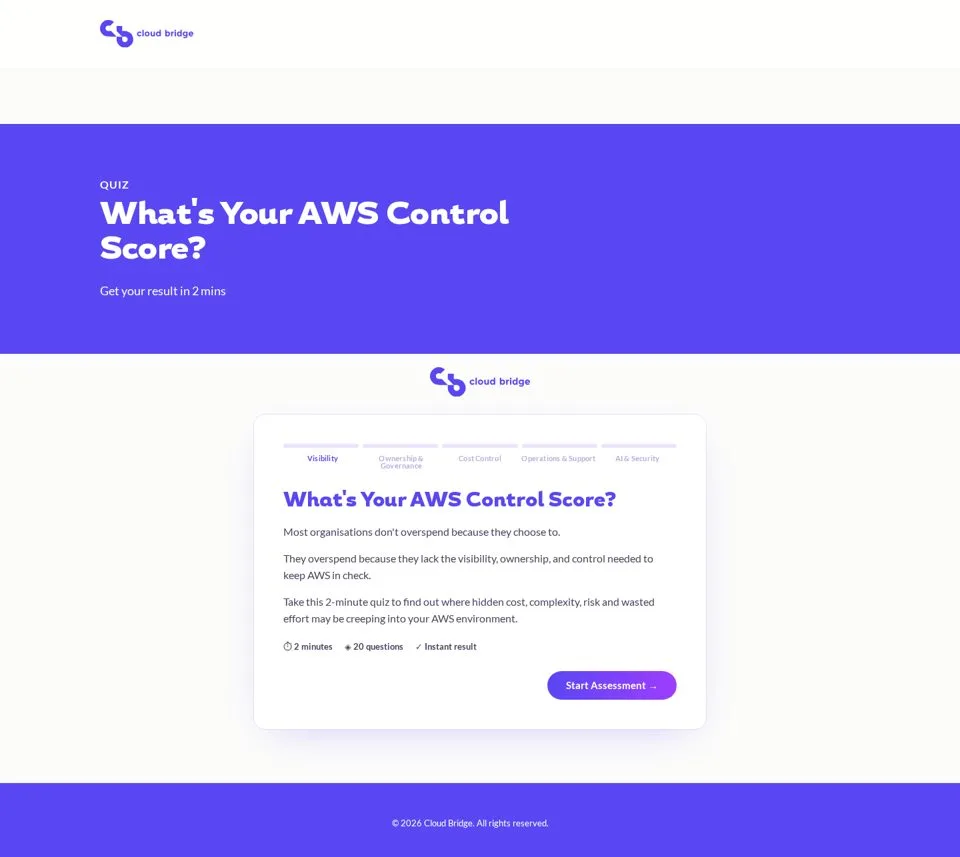
When Cloudbridge, an AWS consultancy, asked for a self-assessment quiz to generate leads, the obvious answer was a quiz tool. There are plenty of them, they look good, and you can have something live in an afternoon.
At GEM Digital, we built it in HubSpot instead. No third-party tool, no iframe, no extra subscription. The quiz is a custom module on a HubSpot landing page, and every completed assessment lands in the CRM as a contact with their score and result attached.
This post walks through how it was built, the decisions that mattered, and when we'd still recommend a quiz tool instead.
Why build it in HubSpot at all?
Cloudbridge were already on HubSpot Content Hub, so the platform could host custom code. That made the trade-off simple.
A quiz tool would have meant:
- Another subscription to pay for and manage
- An integration to connect results to HubSpot, and to fix when it breaks
- Styling that never quite matches the rest of the site
- Quiz data living in two places
Building it natively meant the quiz looks like the rest of their site, the page sits on their own domain with HubSpot's analytics, and the results go straight into the CRM where sales and marketing can use them. Once it's built, there's nothing else to maintain.
Step 1: Design the questions before touching any code
The structure came first. Cloudbridge wanted to help prospects see where their AWS governance was strong and where it had gaps, so the questions were grouped into five areas:
- Visibility
- Ownership & Governance
- Cost Control
- Operations & Support
- AI & Security
Each area has four questions, giving 20 in total. That's enough to feel thorough without people dropping off halfway.
Every question has three answers: Yes, Partially and No. A plain yes or no forces people into answers that aren't quite true, and "partially" is often the most honest answer in governance. It also gives the scoring more nuance.
Tip: Get the questions and answer options signed off in a document before you build anything. Changing a question after the scoring logic is written is far more work than changing it in a Google Doc.
Step 2: Prototype it in plain HTML first
Before writing any HubSpot module code, we built a standalone HTML preview of the full quiz and shared it with the client.
This step saved a lot of back and forth. The client could click through every question, see the progress bar and test the results screens without anything being connected to HubSpot. Feedback was about the experience, not about bugs.
One decision that came out of the prototype was manual "Next" buttons instead of auto-advance. Auto-advance feels slick in a demo, but in a real assessment people want to change their minds, and a mis-click skipping them to the next question is frustrating. A visible Next button, plus the option to go back, made the quiz feel more considered.
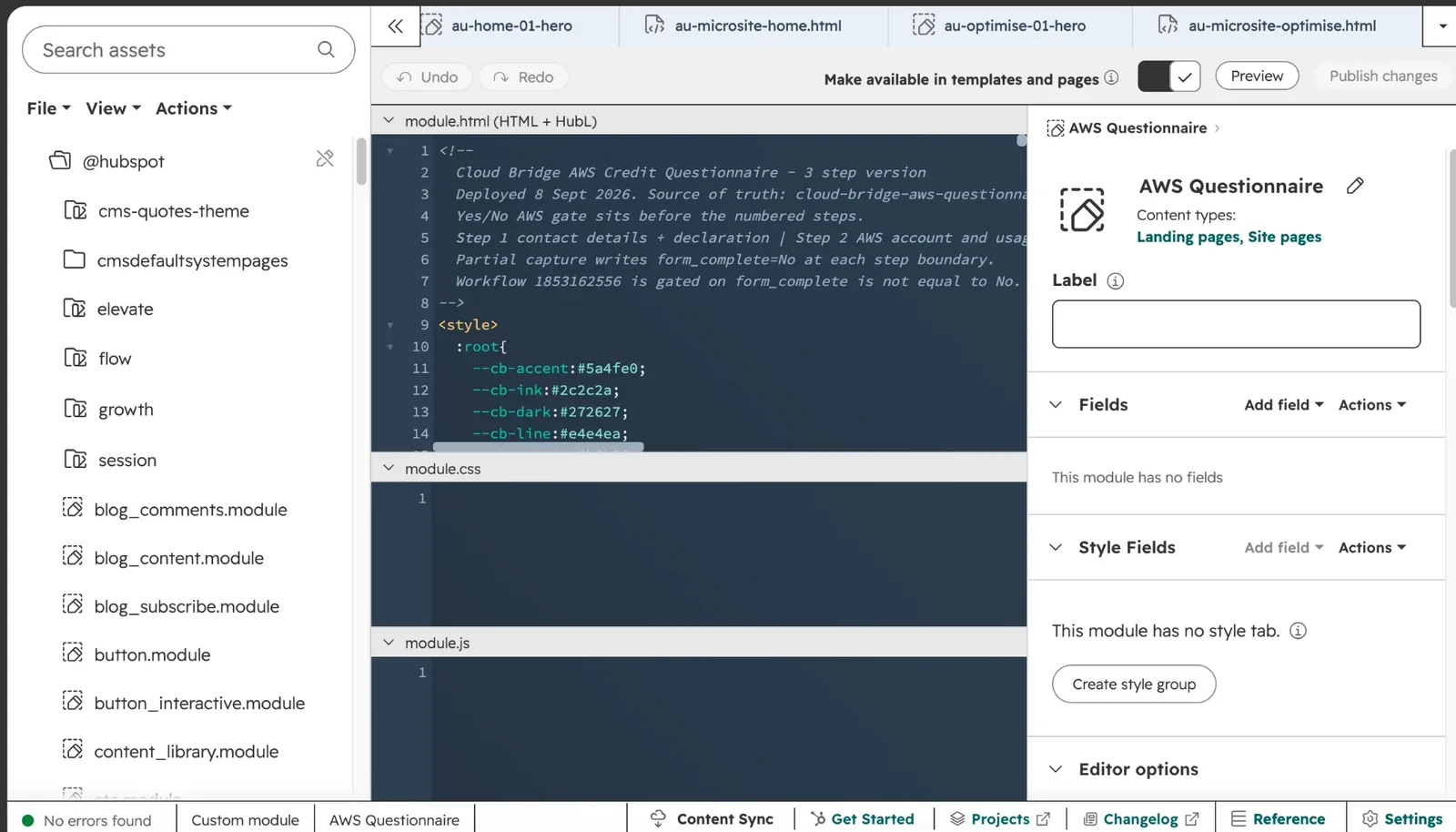
Once the prototype was approved, we moved the same HTML, CSS and JavaScript into a custom module in HubSpot's Design Manager.
Step 3: Keep the scoring simple
Each answer carries a value, and the total score places the person in one of three outcome bands:
- Strong Governance Foundations
- Governance Gaps Identified
- High Governance Risk
The scoring logic doesn't need to be clever. Here's the general shape of it:
const points = { yes: 2, partially: 1, no: 0 };

function getResult(answers) {
  const score = answers.reduce((total, answer) => total + points[answer], 0);

  if (score >= 30) return "Strong Governance Foundations";
  if (score >= 18) return "Governance Gaps Identified";
  return "High Governance Risk";
}
Simple scoring is easier to explain to the client, easier to adjust later, and easier for sales to understand when they see a result on a contact record.
Step 4: Capture the lead before showing results
The lead capture step sits between the last question and the results page. By that point the person has answered 20 questions and wants to see their outcome, so they're far more likely to share their details than on a form at the start.
Keep this form short. Ask only for what sales will actually use. Every extra field costs you completions.
Step 5: Get the results into HubSpot
This is the part that makes a native build worth it.
A HubSpot form sits hidden on the page. When someone completes the lead capture step, the quiz fills in that form's fields with their contact details, their score and their outcome band, then submits it. To HubSpot, it's a normal form submission, so:
- The contact is created or updated in the CRM
- The score and outcome band are saved to contact properties
- The submission shows against the landing page and form in HubSpot's reporting
- Workflows can be triggered off the result
That last point is where the value is. A contact with a High Governance Risk result can go into a different follow-up sequence, or be flagged to sales straight away, compared with someone who scored well.
Tip: Test the full journey end to end with a real email address before launch. Check the contact record, the property values and the form submission all appear correctly. It's easy for a quiz to look finished while nothing is actually reaching the CRM.
Step 6: Make every result end in one clear action
Each of the three results pages explains what the score means, and every one ends with the same call to action: Book a Governance Review.
Whatever the result, the next step is a conversation. A strong score still benefits from a review, and a weak score makes the case for one. One clear CTA works better than a menu of options.
What we'd tell anyone building one
- Agree the questions and scoring before building. It's the part most likely to change.
- Prototype outside HubSpot first. It separates design feedback from technical work.
- Don't auto-advance. Let people change their answers.
- Put lead capture before results, and keep it short.
- Save the score and outcome to contact properties, not just the form submission, so you can segment and automate on them.
- Give every result one clear next step.
When a quiz tool is still the better choice
A native build isn't always the right answer. We'd still recommend a dedicated quiz tool if:
- You're not on Content Hub, so you can't host custom code
- You need complex branching, where questions change based on earlier answers
- Your marketing team wants to create and edit lots of quizzes themselves without a developer
- You need it live in days rather than a couple of weeks
For a single, high-value assessment that needs to match your brand and feed your CRM cleanly, building it in HubSpot is hard to beat.
You can see the full Cloudbridge build in the case study.
An interactive governance assessment that turns visitors into qualified leads.
Related posts
Got a HubSpot problem like this?